UNIVERSITY OF KOBLENZ
Universitätsstraße 1
56070 Koblenz

You can download certificates of study (Studienbescheinigungen) and certificates according to § 9 BAföG yourself via eCampus as PDF files.
Your student ID (Studierendenausweis) is a multifunctional chip card whose validity must be renewed by you every semester. To do this, please use the validation stations in the ground floor of the D building on the Campus in Koblenz-Metternich.
You can see your re-registration status on your personal homepage in KLIPS below "Status Of Enrollment". You can also see there whether your semester fee has been booked. If the transfer is not displayed although you have transferred the amount and the re-registration period has not yet ended, your payment could not be automatically allocated. In this case, please send the transfer receipt to the Student Registrar's Office (Studierendensekretariat).
To download your certificates log into eCampus and click the 'Menü'-Button on the top left. Then navigate via 'My Studies' > 'Student Service' to the section 'Requested Reports / Reports'.
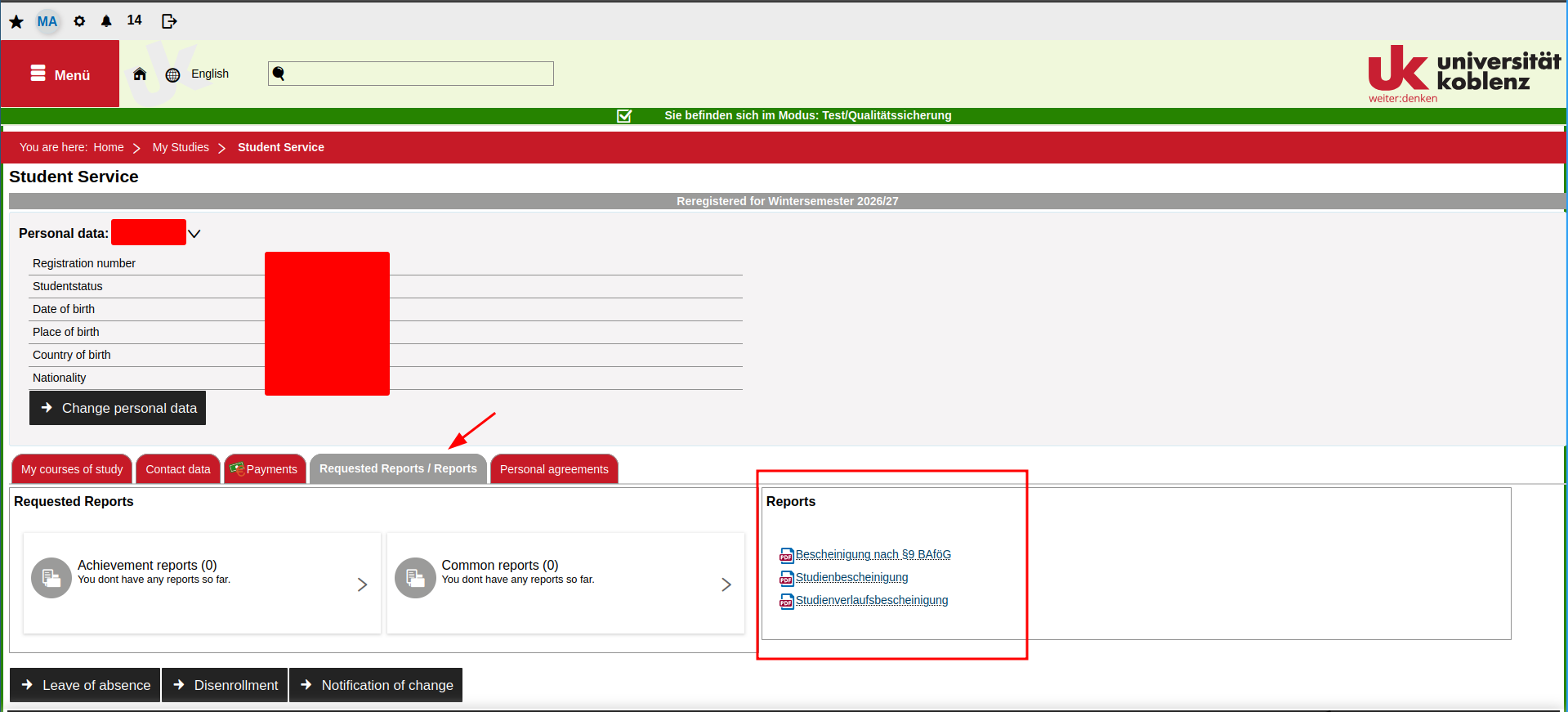
Unfortunately we currently only provide detailed instructions on navigating eCampus in German. The English version will be available shortly.
However, the images in the German instruction may help you navigate the website.
Or instead of navigating in eCampus use the link on the KLIPS main page, section 'Certificates', leading directly to 'Student Service' and click on the section 'Requested Reports / Reports'.
UNIVERSITY OF KOBLENZ
Universitätsstraße 1
56070 Koblenz
© Universität Koblenz